Here's a problem every SDR and sales professional knows: you want to send a personalized video DM on LinkedIn, but video messaging only works on LinkedIn's mobile app. So you either pull out your phone every time (annoying), or you use Sendspark, Loom, or Vidyard to send a link instead. But here's the catch: those link-based videos are killing your response rates, and you probably don't even realize it.
Introduction
Video DMs work. Really well. Teams like Alleyoop are booking 1 meeting for every 5 video DMs they send. That's a 20% conversion rate. Think about that for a second. When was the last time you saw those numbers from cold text outreach?
The reason is simple: in a world drowning in AI-generated walls of text, video messages stand out. Most people receive maybe one video DM per month compared to dozens of generic text messages every day. A video shows effort, builds trust, and cuts through the noise instantly.
But here's the problem: if you're sending videos through Sendspark, Loom, or similar services, you're sabotaging your own success. Let me explain why.
Why Sendspark Links Fall Short
LinkedIn Actually Warns Your Prospects About Your Video
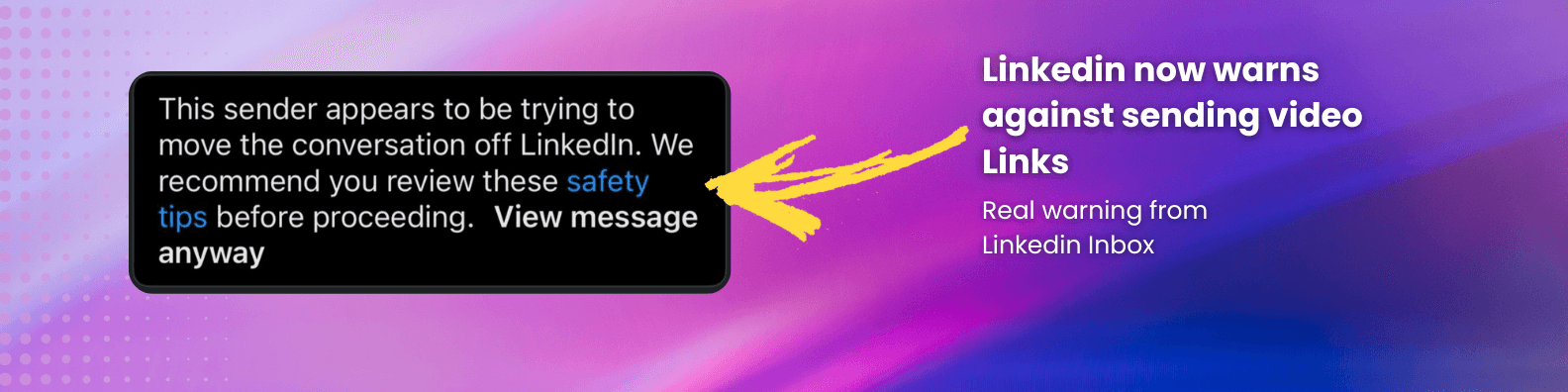
Here's something most people don't realize: when you send a Sendspark or Loom link in a LinkedIn DM, LinkedIn often displays a warning message to your prospect saying "this person is trying to take you outside of LinkedIn."
Think about what that does to your credibility. You're trying to build trust with a personalized video, and LinkedIn is literally telling your prospect to be suspicious of you. It's the digital equivalent of someone whispering "be careful" right as you're introducing yourself.
And it gets worse. LinkedIn actively discourages users from clicking external links. This isn't a bug; it's by design. LinkedIn wants to keep users on their platform, so they penalize messages with external URLs.
Your Messages End Up in the "Other" Folder
When you send a message with an external link to someone you're not connected with, there's a high chance it gets filtered into LinkedIn's "Other" messages section, the place people rarely check. It's the LinkedIn equivalent of the spam folder.
You spent time recording a personalized video, crafted the perfect hook, and nailed your value proposition. But your prospect never sees it because LinkedIn's algorithm flagged your message as potentially spammy due to the external link.
Every Click Is a Chance to Lose Them
Let's walk through what happens when someone receives your Sendspark video link:
- They see your message (if it didn't get filtered)
- They see the link
- They see LinkedIn's warning (maybe)
- They decide whether to click (friction #1)
- They click and leave LinkedIn
- They wait for Sendspark's page to load (friction #2)
- They see your video player
- They decide whether to press play (friction #3)
That's three separate moments where they can bail. Three chances for doubt to creep in. Three opportunities for "I'll watch this later" (spoiler: they won't).
Compare that to a native video DM that autoplays right inside LinkedIn. They open the message, and boom, your face is already on screen. No clicks. No warnings. No friction.
Native Video Wins (And It's Not Even Close)
LinkedIn's Algorithm Actively Promotes Native Content
LinkedIn's algorithm has one job: keep people on LinkedIn. So it's programmed to reward content that keeps users engaged on the platform and penalize anything that sends them away.
When you upload a native video (either directly through LinkedIn mobile or using Quibbly on desktop), LinkedIn treats it favorably. Your message is more likely to land in the primary inbox, more likely to be seen, and more likely to generate engagement.
External links? They get the opposite treatment. LinkedIn actively suppresses them because every click away from LinkedIn is a loss for their engagement metrics.
The Viewing Experience Matters More Than You Think
When a video plays natively inside LinkedIn, it feels natural. Your prospect doesn't have to make a decision. The video just starts playing as they read your message. It's frictionless.
More importantly, it feels personal. You took the time to record a video specifically for them (or so it seems), and you're delivering it in a format that feels native to the platform they're already using. It doesn't feel like marketing. It feels like communication.
Link-based videos, on the other hand, feel like you're sending them to a landing page. It's immediately less personal, more transactional, more suspicious. Even if the content is identical, the delivery method changes the perception entirely.
The Playbook: How to Actually Send Video DMs That Get Responses
Now that you understand why native video wins, here's how to actually implement it:
- Keep it short and punchy: Your hook needs to land in the first 3 seconds. Think "Hey [Name], just saw you raised $5M..." not "Hi, my name is..." Keep total length to 60-90 seconds max.
- Use scalable personalization: Don't talk about hobbies or where they went to college. Reference real business triggers: funding rounds, job changes, company news, recent posts. Things you can spot in 10 seconds of research.
- Show, don't tell: If you're selling a product, show your screen for 5 seconds instead of describing features for 30 seconds. Visual beats verbal every time.
- End with one clear next step: Not "let me know if you want to chat" but "does Thursday at 2pm work for a 15-minute call?" Specificity converts.
- Technical optimization: Record in good lighting, use decent audio, and optimize for mobile viewing since most LinkedIn users check messages on their phones.
LinkedIn Video DM Templates
Below are some example templates that work. Personalize the signal, keep it human, and end with one easy next step.
Hey James, just saw your comment under NAME's post about cold calling — thought this might be relevant.
I speak with a lot of sales leaders and they often tell me that first-touch replies nosedive when reps send links or long scripts.
Are you seeing the same drop-off on your team's first touch?
Asking because we've worked with Y and Z (similar-sized companies) who were struggling with the same issue — moving to quick native video lifted replies 2–3x within a month.
Curious to hear your take — worth sharing the simple workflow that worked for them?
Congrats on the launch — noticed your post about the new integration. Nice work.
Founders I speak with often mention that demos die when prospects have to click out of LinkedIn — too much friction at the moment of interest.
Is keeping everything native a priority for your team this quarter?
We helped ACME and Northwind keep product teases in-thread with short native clips — response rates jumped without adding more steps.
Open to a 60-second walkthrough showing the exact flow?
Saw your comment about hiring SDRs — timing seems busy on your end.
Recruiting leaders tell me candidate replies drop when messages feel templated or ask for too much in the first note.
Do you notice stronger engagement when you add a short human intro (voice/video) first?
Teams at Brightwave and Polar switched to 30–45s intros and saw faster yes/no replies, even from passive candidates.
Happy to share a 3-line script and recording setup if helpful.
Noticed your team just rolled out the new workspace — nice milestone.
CS leaders tell me renewal convos stall when updates live behind links that people don't open on mobile.
Would a 45s native clip highlighting the 2 changes they care about help your CSMs?
We saw this with DeltaSoft — in-thread video updates cut ‘missed it’ replies and nudged expansion chats forward.
If you want, I can share a quick outline your team can copy.
Why This Works
Think about the last 10 LinkedIn messages you received. How many were clearly AI-generated? How many started with "I hope this message finds you well" or spent three paragraphs explaining who the sender is before getting to the point?
Now think about the last video DM you received. When was it? Last month? Last quarter? Ever?
That's the gap. Everyone is competing in the text message space, sending the same templated outreach that AI can now generate in seconds. But video? Video still signals effort. It still stands out. It still gets opened.
The templates above work because they bypass the spam filters (both algorithmic and mental), reference real business signals instead of shallow personalization, and make it incredibly easy to respond. No one ignores a personalized video that shows you actually understand their business.
Implementation Tips
Here's how to integrate native video DMs into your actual workflow without burning hours every day:
- Use it as a pattern interrupt: Video DMs work best when someone isn't expecting them. Use them to revive cold threads, break into key accounts, or follow up after a lightweight interaction (like commenting on their post).
- Batch your recording: Set aside 30 minutes, identify 15-20 high-value prospects, and record all your videos in one session. You'll get faster and better with each one.
- Layer it into sequences: Video DMs shouldn't replace your entire outreach strategy. They should amplify it. Use them as a high-impact touch in a multi-channel sequence (email → LinkedIn connection → comment on post → video DM).
- Track what works: Pay attention to which hooks get responses. "Saw you raised funding" might work better than "noticed you posted about X." Double down on what converts.
Conclusion
If you're sending video DMs through Sendspark, Loom, or Vidyard, you're adding friction at exactly the wrong moment. LinkedIn warns prospects about your links, filters your messages to the "Other" folder, and makes people click away from their feed just to watch your video.
Meanwhile, native video DMs autoplay right in the inbox, avoid spam filters, and feel personal instead of promotional. The data backs this up. Teams sending native video DMs are seeing response rates that text-based outreach can't touch.
The problem has always been that LinkedIn only allows video DMs on mobile, which means pulling out your phone every time you want to send one. That's where Quibbly comes in. It's a simple Chrome extension that adds native video and voice note functionality directly to LinkedIn's desktop interface. No separate platform, no links, no friction. Just record and send, exactly like you would on mobile.
Your videos play right inside LinkedIn, your messages stay in the primary inbox, and your prospects don't have to click anything to start watching. It's the easiest way to get the conversion rates of video DMs without the hassle of switching to mobile every time.
If you're serious about standing out in a sea of AI-generated text messages and actually starting conversations with your ideal prospects, it's time to stop sending links and start sending native video. Try Quibbly and see the difference yourself.
Ready to 7x your replies on Linkedin?
Get started with Quibbly to send videos and audio that play within Linkedin.